Pivoted an engineering-led B2B cybersecurity product team from costly UI redesign to user centered strategic feature enhancements building their first UX practice
“Great collaboration! Her hard work and the care that goes into her work were evident!”
Summary Overview
My Role:
As the sole UX Researcher & Strategist, I had to establish the foundation of their UX practice from the ground up, own the UX workstream, recommend strategies that optimised engineer cost and time and help them in decision-making regarding already scoped ideas and features in the pipeline for UI.
Questions helped them answer:
- How to build a sought after high end cybersecurity product that focuses on high-quality minimal clients but also lands the “Oh! Yes!” moment in the 20-min demos?
- Simultaneously, how to deliver a product that is easy to understand for a beginner or someone from leadership with low tool-experience but one that is also exciting and engaging enough that the experienced user is happy to renew it / choose over competitor?
Challenges I helped them uncover and define:
- As new features are added to meet demand for scalability and robustness, the dashboard grows visually complex. This risks losing the unmotivated IT admin, and personalizing product per-client for ease of use is costly and often non-beneficial for the product overall .
- How to decide which UI designs that we’ve populated are actually enjoyed by the user and the decision makers that choose our product over others?
- How to ensure that the features that we are introducing actually meet our client goals such as the number of devices a new client might have or optimize time in customer support we might have to offer?
Timeline:
The initial scope was to simply help them make unanimously best decisions on UX for their client, business and product goals by auditing the entire product and offering overall ideas. We extended the scope of say 2 weeks of auditing into a 2-month sprint, compressing what is typically a 6-month discovery and validation cycle into rapid, iterative phases: stakeholder alignment, qualitative interviews, heuristic audits, and Maze usability validation.
Discovering that missing user research was costing product owners time and money
I have always merged tech fluency with qualitative and creative user research practices owing to my background studying Information Tech and HCI, and working with emerging tech such as XR. This helps me translate deep technical workflows into intuitive experiences inspired by the psychology-led human world outside the digital-led flows. The Founder of CORS Lab Technology, a B2B cybersecurity firm, is a trusted ethical hacker in my network who secured my own website. During a catchup, he mentioned his pains in recruiting a UI intern as, he said, the take home case studies they presented as part of the recruitment process did not seem promising to meet the business’ goals nor offer something different to what their devs were already building. When I asked to see the interns’ works, which turned out to be near perfect, highly polished, impressive UI designs, my immediate question was, ‘What data formed the reasoning behind their design choices?’
It turned out the designs were based on problems stated by the team during their initial call, there was no access to any user studies, and the focus mentioned on call seemed to be around solving engineering’s dilemma about how to design new features to make their product most appealing to the user. Because the take-home design prompts lacked user research data, the visual proposals naturally mirrored what engineering had already conceived. Recognizing that focusing purely on aesthetic UI risked solving the wrong problem, I offered to facilitate an alignment workshop i.e. the need for UXRs and designers in their team (further reaffirmed when they said time and cost-efficiency was of the essence for them), I offered to facilitate a call to understand their needs and help them with the best approach to onboard a UI intern.
I conducted a workshop for CEO, CTO and Engineering and brought them to the same call to align on product, user and business goals, and there was some mismatch and some overlaps, and hence a need for loads of clarity. I identified an understandable initial skepticism paired with a clear, urgent need for UX guidance, which I predicted was costing engineering big time and money in decision-making that was now happening through instinct.
When I offered an advisory call initially to propose the changes I could help them with - which will not be around UI, but rather to discourage from pursuing UI and spend more time on UX - they brought me in to own UX and strategy entirely over a 2-month sprint
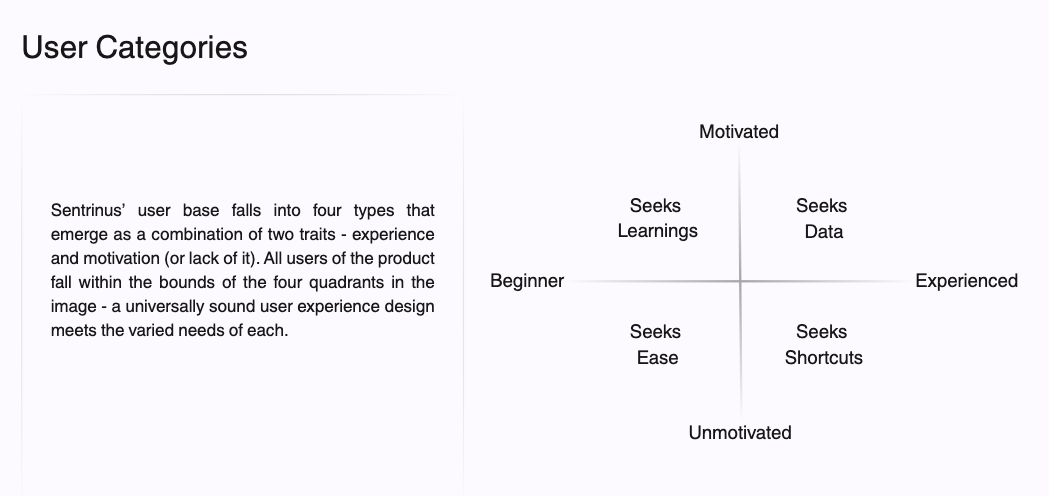
I went on to work with the C-suite and engineering, advocated for targeted human-centered feature iterations over an unvalidated full UI redesign, and introduced an evaluation framework to standardise future research across four distinct user personas for their product - Sentrinus.
My Approach
The goals:
- To ensure the product (Sentrinus) truly met client comfort and day-to-day operational needs rather than building on assumptions, and doing so in a manner that saves time and costs
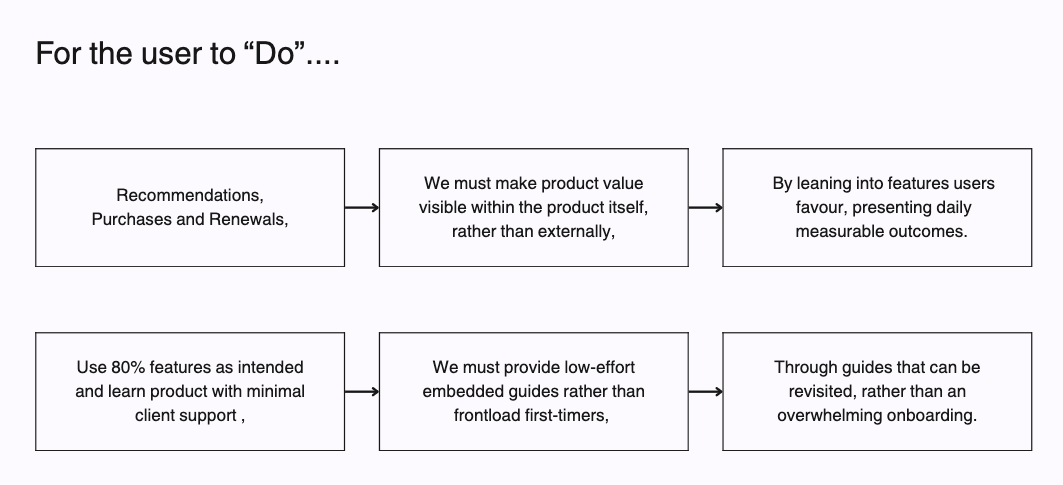
- Navigating the friction faced by engineering, between client demands for bespoke UI elements for their organisation (the "Horse") and what genuinely solves their cybersecurity problems - accurate features, reduced cognitive load, and unmissable alerts (the "Car").
- Bridging engineering’s goals with client workflows to design rapidly but clearly, enabling any admin to get an "Everything is fantastic" status check within 5 seconds of login while also empowering sales to convert prospects seamlessly within 20-minute product demos.
Constraints & Tradeoffs
I initially planned an exhaustive round of 1:1 user interviews with external client decision-makers. However, leadership and engineering pushed back as they were hesitant about outside critique and protective of the product. To adapt to a team that had never had UX before, I made a deliberate trade-off: I chose quality over quantity. I had to find a way to get user’s feedback and observe them use the product without making product stakeholders defensive. I had to ensure we didn’t compromise on valuable user behaviour data while making a convincing argument for why these interviews were going to benefit and how.
Given that they had a strong UI and sales capabilities, it was apparent that 1:1 interviews and user conversations were missing in this case, an opportunity to uncover valuable insights. I couldn’t yet promise at this stage what we will uncover - but I could map the general themes around which we phrased our questions where I needed answers. For example - will an inexperienced user still be able to use this tool to secure their organisation? Will they be able to prioritise some functions while deprioritising others? What factors influence the liking of the tool?
Methods
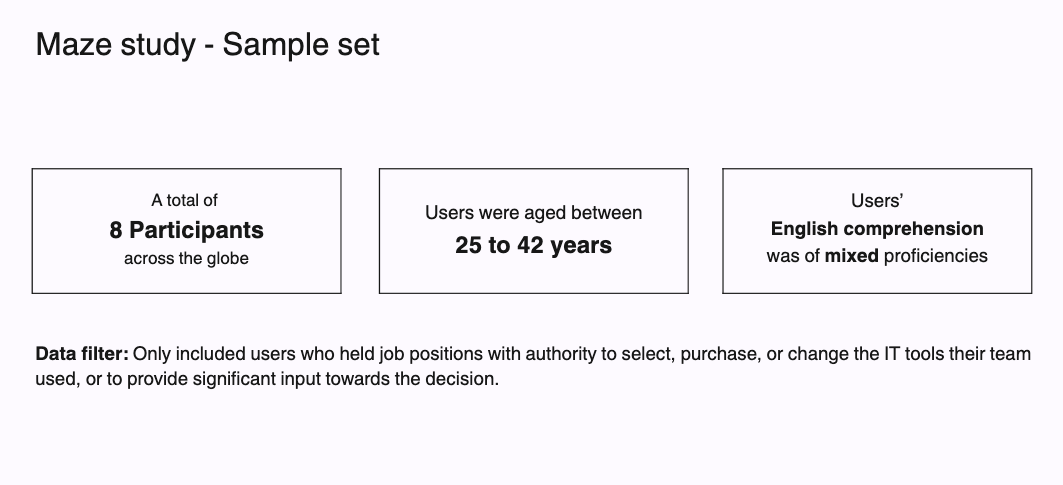
For 1:1 sessions, I recruited diverse internal team members whose technical habits closely mirrored client archetypes alongside their existing clients (their existing end-users). For external testing on Maze (N = 11), I applied strict screener rules to recruit verified IT purchasing decision-makers, proactively masking confidential product data to protect company privacy.
The analysis methods were qualitative trend analysis, behavioural correlation and causation analysis and quantitative prioritisation matrices, along with clear definition of user persona types, empathy mapping and deriving a score for decision-making support for non-UX and future UX practitioners.
Instead of forcing a numbers game externally, I split the research into two strategic streams.
First, I conducted internal 1:1 qualitative interviews by carefully mapping internal roles to future client personas, prioritizing diversity across gender, neurodivergence, and varied tech backgrounds. I paired this with my own heuristic audits and facilitating C-suite alignment workshops (CEO, CTO, engineering).
Second, the lack in my sample set was the users that made decisions regarding the purchase and renewal of the product. I deployed an unmoderated Maze usability study with strict recruitment filters targeting external IT decision-makers ie. who decide what product suite their teams use and allocate funds for renewals. This balanced deep, empathetic qualitative understanding with quantitative validation, as well as brought in the missing user’s inputs I was seeking.
Success Criteria:
- Identify the friction points standing in between the defined product, client and UX goals, and strategise a redesign in a cost and time-efficient manner
- Strategic recommendations that transform the existing product into a user-friendly tool appreciated by all users
- Changes that directly impact quick-grasp by users and their feeling of the benefit of the ease and value of the tool for their organisation in doing their job both long term day- to-day and during high-stakes scenarios
- Higher conversions during demos, retain more clients, and scale from ~10 to ~100+ devices and 10 - 15 users per client, without losing the ease of use of the current version
- Reduced engineering effort, protecting and reinforcing existing product structure while optimising to meet USP and flagging future user satisfaction risks that can be mitigated
- Helping reduce decision making time regarding the priority of features (what to build first and last), for higher alert-to-resolution flow and reduced panic among users
- Risk mitigation during scaling and onboarding new clients
In-depth behavioural analysis and usability testing complemented by a Maze study with AI-assisted questioning and heatmaps, which led to a Universal Appeal Score
User Studies
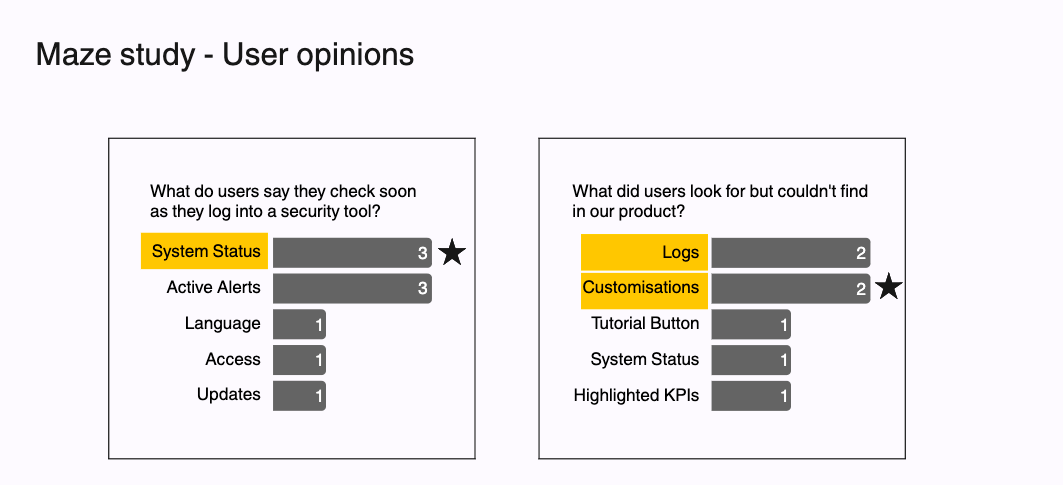
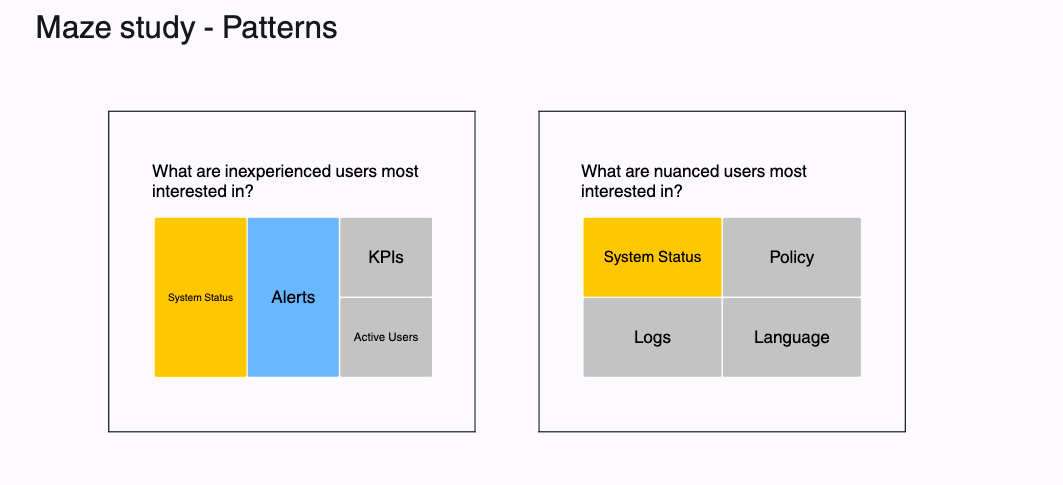
I authored the moderation guides, conducted user interviews and wrote out the Maze questions and tasks. For the user studies, the primary methods were conversational and screen observation of tasks. For Maze, I structured timed navigation tasks testing how quickly decision-makers could locate critical security summaries and manage configuration settings without assistance. Gen AI came really handy during the surveys due to being able to ask relevant followup questions based on user answers. The AI was trained to probe around the problem statements we were solving.
Some sample questions I probed into with the users were:
Some sample questions Gen AI followed up with were:
User1: Yes, the overview seems useful because key metrics like unresolved alerts. These metrics, along with real time alert trends, make it easy to infer where attention is needed and i would trust this product to flag critical issues provided its detection rules and logs are accurate
Gen AI: What specific features or information would increase your trust in the accuracy of the detection rules and logs?
User1: Having clear drill-down capabilities showing detailed raw event logs, timestam,ped audit trails and customizable detection rule thresholds would significantly increase my trust
User 2: I immediately saw the widgets I referred to in the previous stages which was a good sign for me. However, I would prefer the unhandled issues/risk to be more highlighted to have better visibility
GenAI: Why do you think highlighting unhandled issues or risks more prominently would improve your ability to manage cyber threats?
User 2: I think it would be easier to notice and thus promptly react
During user interviews - the questions skewed more towards what an experienced user might want to answer with more focus on questions 3 to 5. Further, usability tasks were tested such as:
- How would you read the security status of your organisation by looking at this dashboard?
- How would you teach this tool to a new member on your team?
- Could you please find <name of feature> for me? (To assess if time taken is justified during an attack)
Analysis
Utilising empathy maps, user journeys, heatmaps, heuristics evaluation and Maze studies, I was aiming to extract:
1) what do users like, want and dislike
2) what are they happy to accommodate / managing to get by
I pulled out heatmaps for mouse tracking and attention insight, to tally against my own usability studies, to understand if there were any behavioral biases in my current sample set compared to a larger untested one, to detect and account for a few such as ‘not noticing the navigation bar’ was a risk in heat maps, however during usability tests this wasn’t an issue. This phase proved to be a time-consuming affair that took most of my time, hence leading me to the inception of the idea of a Universal Appeal Score for future analysts.
Team Assumptions & Biases:
- Assumptions:
- User personas will be limited to the current target end-users even as the product and business grow.
- Users we interviewed internally felt comfortable enough to be honest in 1:1 interviews
- Product owners are the best team to take final calls on research, insights and changes.
- Bias: The user experience for a B2B SaaS app shouldn’t stray too far away from what is familiar among competitor tools for risk of losing the end user due to lack of trust or high learning curve
The need to strike a balance in design for the polarising user personas and the inception of the scoring metric, which were translated into ready-to-ship low-fidelity wireframe recommendations and supportive user insights
Outputs & Deliverables
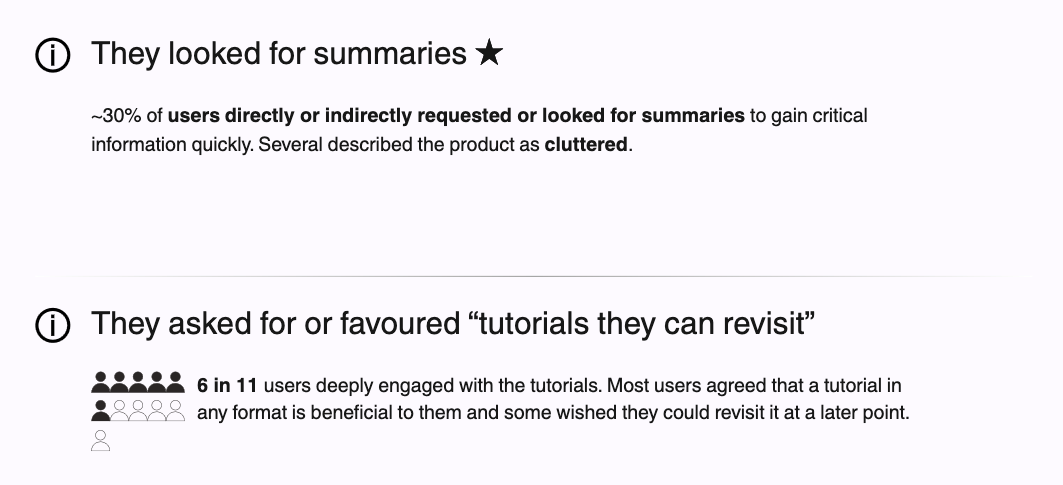
- Being a cybersecurity product there was nervousness to observe threats accurately, the users hence consistently seeked summaries, reaffirming some older UIs engineering had tabled which I encouraged them to pursue
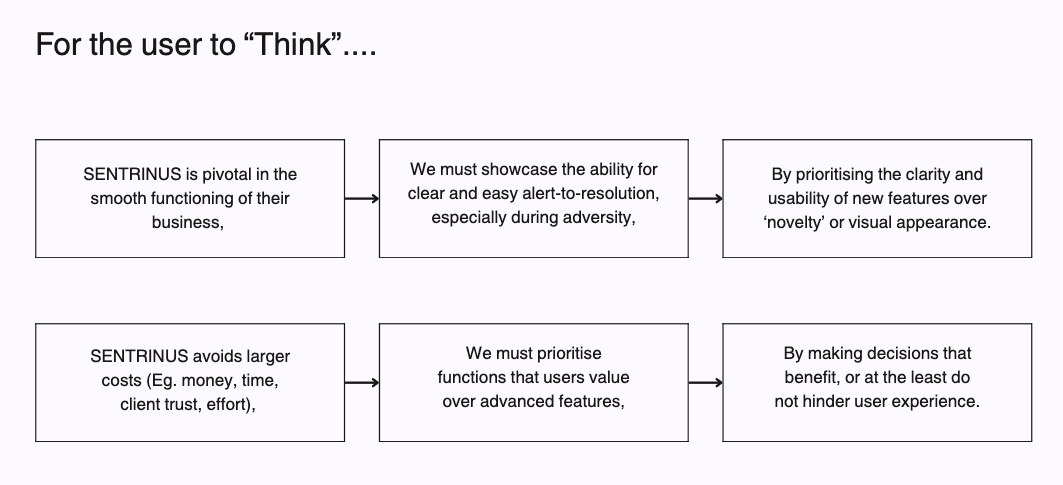
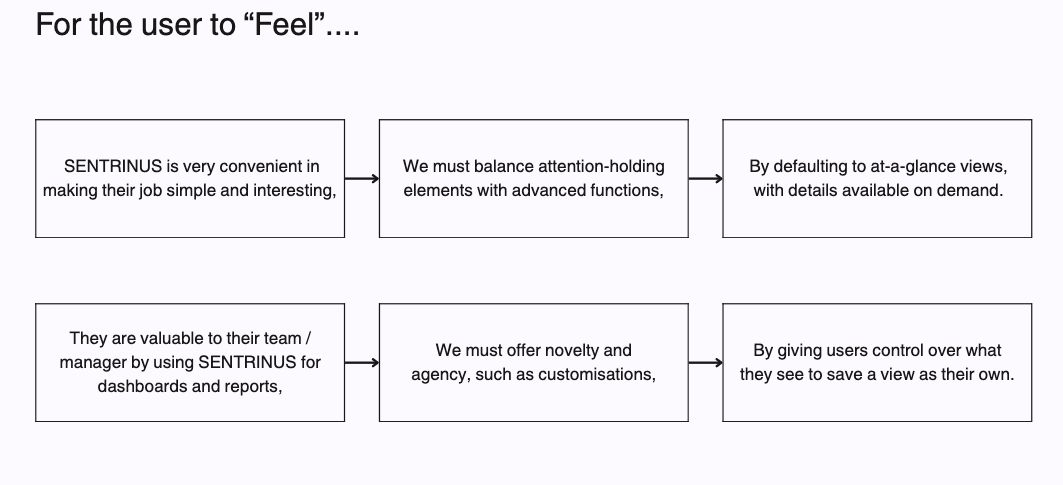
- Based on the business, product and client goals I demonstrated the user personas we were building for in a concise manner so that we can evaluate every UX change to the personas and their requirements
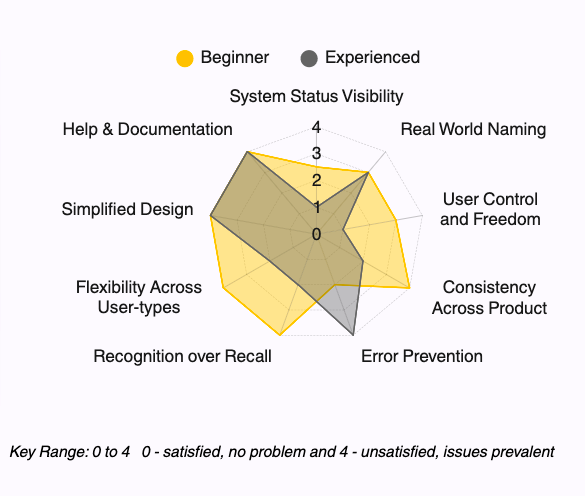
- I mapped the heuristics to the personas and what it means for each of them. The key highlight was around error prevention needs for the experienced user who might commit errors due to over confidence (making it critical in a cybersecurity app)
- I highlighted the difference between the user that uses the product, and the user that signs off its purchase, and the risks in only building for the former and not the latter.
- I provided pitch decks to walk the stakeholders through the strategy and Figmas for actionable documentation.
Sharing & Activation:
I presented my findings in three-stages, to gain consistent trust from stakeholders in the UX process. At each of the stages, the distinguishing factors that helped me gain trust while ensuring the product was built in the right direction were:
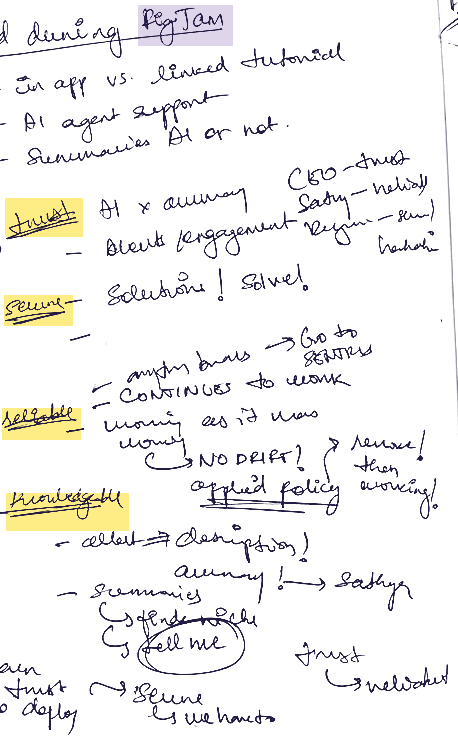
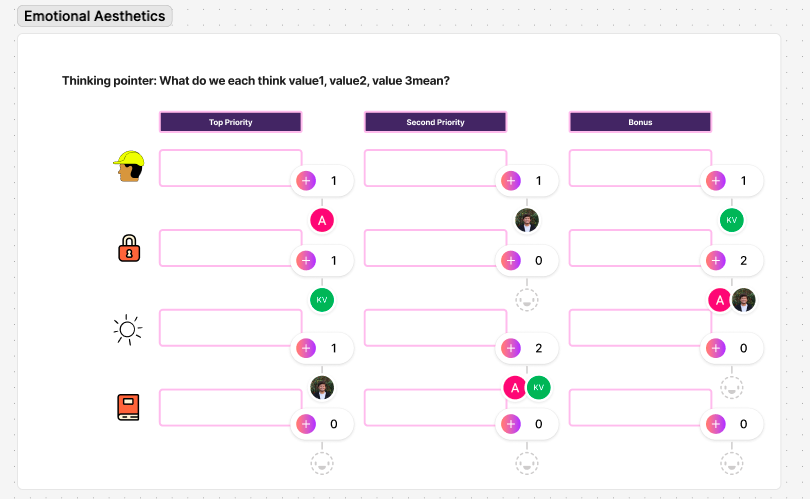
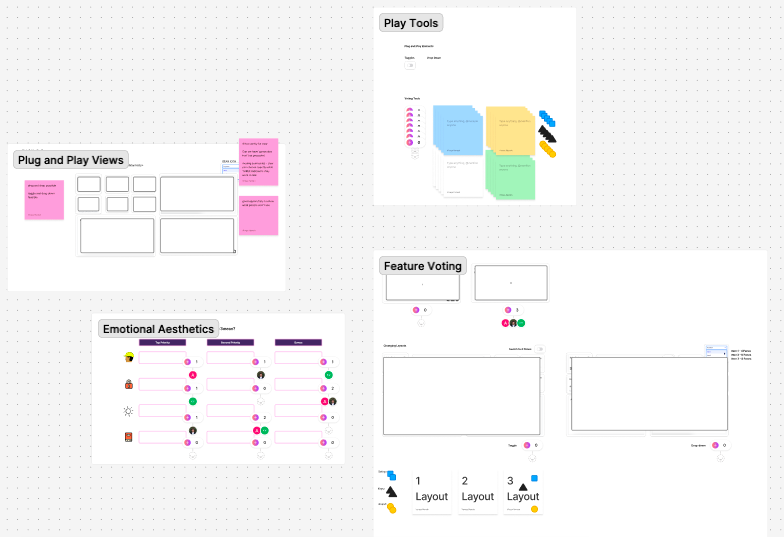
1) Facilitated interactive FigJam workshops with the CEO, CTO, and lead engineers, running feature voting, emotion-led aesthetics alignments, and layout priority exercises.
2) When presenting, I framed user friction around risk mitigation rather than aesthetic critique, given positive feedback was received about UI overall.
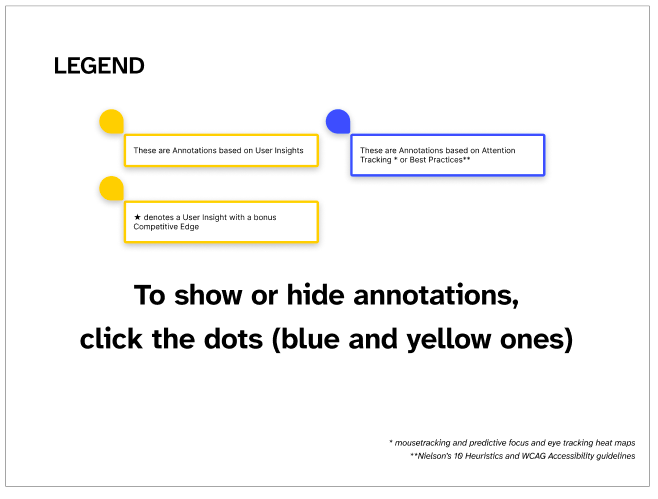
3) The product owners were protective of the product, so there was need to draw a clean thread from user behaviour data, to insight, to proposed changes, I established this with a simply explained pitch deck and ready-to-ship UX changes on Figma (low fidelity wireframes) for least friction.
Crafting the Universal Appeal Score, accelerating decision-making from 6 months to 2 months, and tabling an unnecessary UI overhaul
Insights, Strategy and Recommendations for Business Impact
- Crafted a “Universal Appeal Score”, a metric specific to the Sentrinus product, to aid stakeholders from non-UX domains in decision-making regarding UX and offer a headstart to future UX people
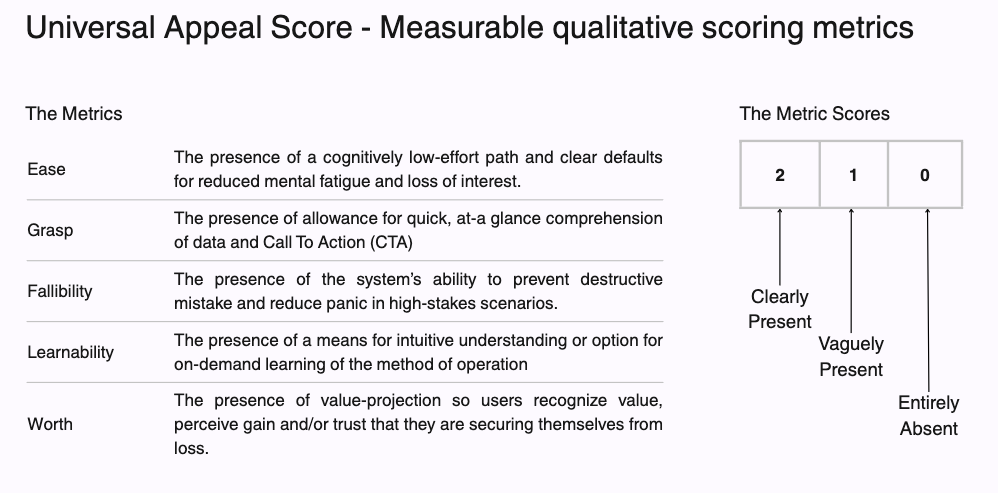
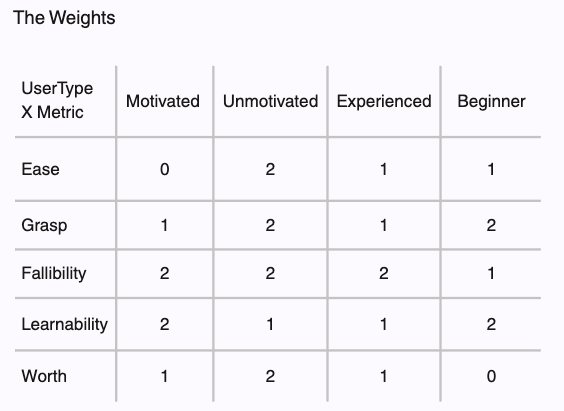
- My work brought a 30% boost in engineering decision-making efficiency. Rather than debating subjective opinions, engineers could prioritize tab-level changes to immediately know what to build, what to cut, and where to avoid wasting effort.
- Pitched user-validated changes that were required to mitigate user dissatisfaction risks during UI changes in the future while building new features and scaling product.
- Catalysing decision making to 2-months for what would’ve taken the team 6 months, I tabled an unvalidated UI-redesign, maneuvering tough conversations with product owners who wanted a ‘futuristic, cool’ UI (as cool as B2B SaaS can be, that is). My pitch deck helped to clearly highlight the insights my research uncovered and reaffirmed - users loved the existing clean, simple UI look, and rated it higher than competitors.
- By shifting focus to high-impact UX fixes (system status indicators, customizable views, at-a-glance summaries), I positioned Sentrinus to scale to 2x clients and 10x end-users in Q4, while establishing the company's first UX workstream.
Recommended Next Steps:
- Implementation of proposed changes in low-fidelity Figma wireframes
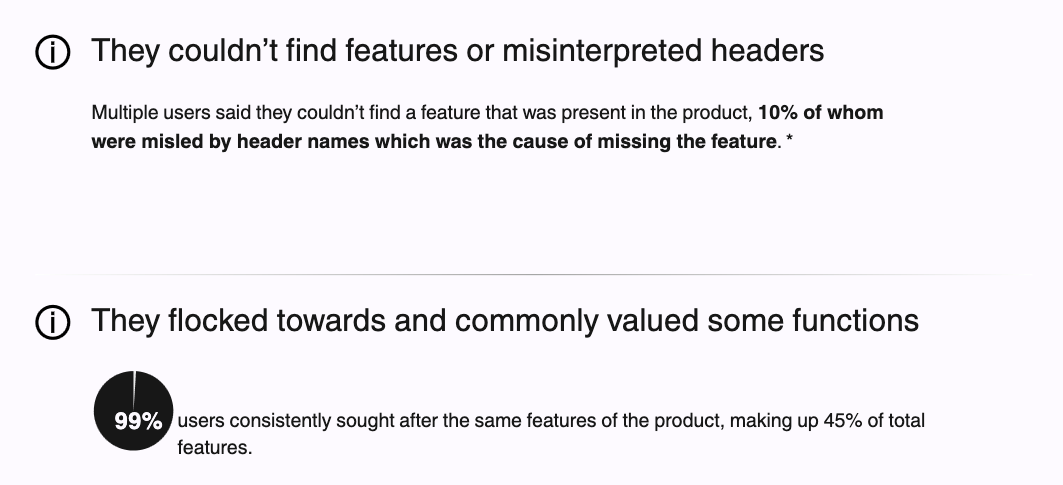
- Empathy led UX writing changes to have summaries, tutorials and intuitive headers, the lack of which led to challenges in navigating the product
- Further preventing error, providing smooth help and documentation to support scaling over phone call support
Reflections:
- Key takeaways (for UX people, experience designers and researchers alike) working with teams without prior user research or experience design workstreams:
- There is need for deeper conviction in the rigor of user behaviour research when entering an engineering-led team with zero prior UX approaches
- Irrespective of how long you’ve worked with a client or in a team or level of work ask for decision-making autonomy upfront for all UX decisions
- Trust-building for stakeholders in the UX practice becomes essential to be able to nudge teams in recommended design direction based on research and analysis
- Surveys can go a long way as long as the audiences are filtered to be accurate as possible and questions are articulated to extract behaviour patterns in focused areas
- GenAI proved very useful to ask follow-up questions during surveys based on responses
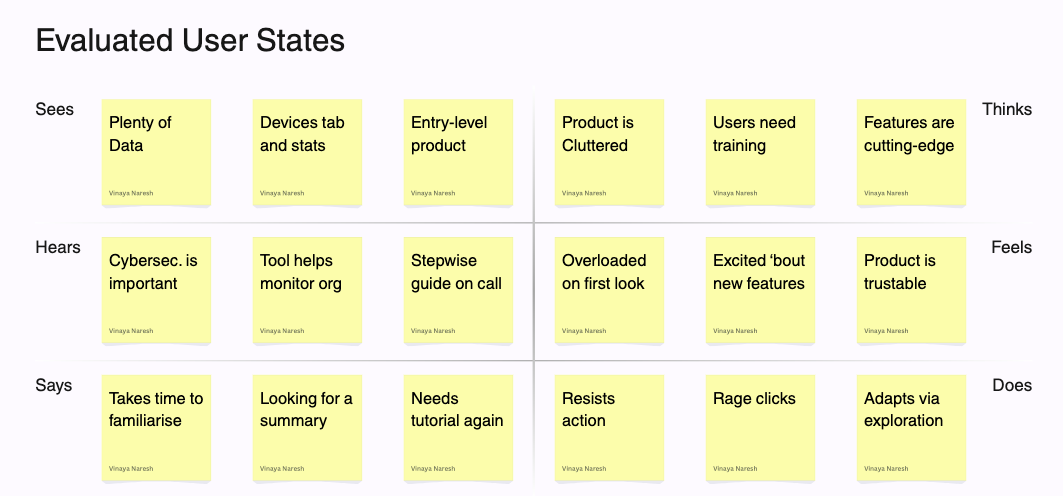
Sample empathy map study
Sees: "Devices tab and stats" | "Devices page is simply a summary of devices"
Hears: "Tool helps monitor org"
Thinks: "Features are cutting-edge" | "Understands he is an 'agent' in cybersecurity parlance"
Feels: "Product is trustable" | "Relaxed and comfy during interview, curious"
Says: "Takes time to familiarise" | "Looking for a summary"
Does: "Intuitively navigated through the sidebar" | "Adapts via exploration" | "Reviews product 1-week in to understand what is error before relying on it"
- Observations:
- Despite high baseline trust ("Product is trustable"), they experience cognitive friction and disorientation upon entry ("Takes time to familiarise", "Looking for a summary").
- Because there was no clear visual hierarchy or CTA, they defaulted entirely to the familiar sidebar to navigate ("Intuitively navigated through the sidebar") and gravitated straight to the Devices tab ("Devices page is simply a summary of devices") to monitor their organization.
- User Insights gained:
- An example that contributed to "100% users intuitively navigated through sidebar" and "70% users navigated to Devices tab"
- Strategic Recommendation:
- Default to at-a-glance status indicators and summaries on the top-left of important and/or information heavy product pages with granular data available on demand
- Make Devices tab the operational hub for monitoring organizations, second to the dashboard. De-prioritise or remove other tabs not being used.
- Flag the need for a UX rewrite for real-world naming to reduce time needed to familiarise and a story-telling flow that carries users through the product
- There is no need to make changes to the ‘look’ of the product, the user already trusts it and finds it cutting-edge.
Protected Case Study
Please enter the password to view UX Research and Strategy for CORS Lab Tech (Sentrinus).